Pinterest for New Bloggers: What I’m Doing to Grow My Blog From Scratch
How I went from an empty Pinterest account to 12K impressions in 30 days—and the simple Pinterest strategy I’m using as a brand-new blogger.
Affiliate Disclosure: This post may contain affiliate links, which means I may earn a commission if you purchase through one of my links at no additional cost to you. As an Amazon Associate I earn from qualifying purchases. I only share products and resources I personally use or genuinely recommend.
When it comes to Pinterest for new bloggers, I’ll be the first to admit—I had absolutely no idea what I was doing when I started. 😂
I actually created my Pinterest account more than six months ago.
And then I proceeded to do…absolutely nothing with it.
I didn’t know what I was supposed to post, what my pins should look like or even what I wanted my Pinterest account to be about.
So it basically sat there.
Fast forward to a little over a month ago when I officially started my blog, Lindsey, Lately…
As I started thinking about how I wanted to grow my blog, I knew I wanted to create content that could continue being discovered instead of relying entirely on posting something to social media and hoping people saw it before it disappeared into the feed.
That’s when I decided it was finally time to figure out Pinterest. I refreshed my account, started creating pins and committed to actually using the platform consistently. You can follow along with my Pinterest here to see what I’m currently creating and testing.
And while I am VERY much still learning, I’m already starting to see some encouraging signs.
In the last 30 days, my Pinterest account has generated 12K impressions, 1K engagements, 155 saves and 20 outbound clicks—with only 7 followers.
So no, this isn’t going to be one of those “I got 100,000 pageviews from Pinterest in 30 days and here’s my secret” posts. 😂
I’m still at the beginning.
Instead, I want to show you what I’m actually doing as a new blogger, what’s happened during my first month of consistently pinning and what I’m learning as I build my Pinterest strategy from scratch.
Why I Decided to Use Pinterest for My Blog
When I started my blog, I was already creating content for platforms like Facebook, Instagram and TikTok.
But I wanted something else, too.
I wanted to start building a library of evergreen content that people could continue discovering long after the day I originally posted it.
That’s a big part of why blogging appealed to me in the first place.
I could spend time creating a useful article and, instead of that content having a lifespan of a day or two on a social feed, it could potentially continue being found through search.
Pinterest felt like a natural extension of that strategy.
There was just one little problem.
I had to actually learn how to use it. 😂
My Pinterest Strategy for New Bloggers
I want to be very clear about something before getting into my strategy:
I am not a Pinterest expert.
I’m documenting what I’m doing right now, what I’m testing and what I’m seeing on my account.
My strategy will probably change as I learn more—and that’s kind of the point of this post.
If you’re another new blogger staring at Pinterest wondering where to even begin, I want you to be able to follow along with someone who’s figuring it out right alongside you.
Here is what I’m currently doing.
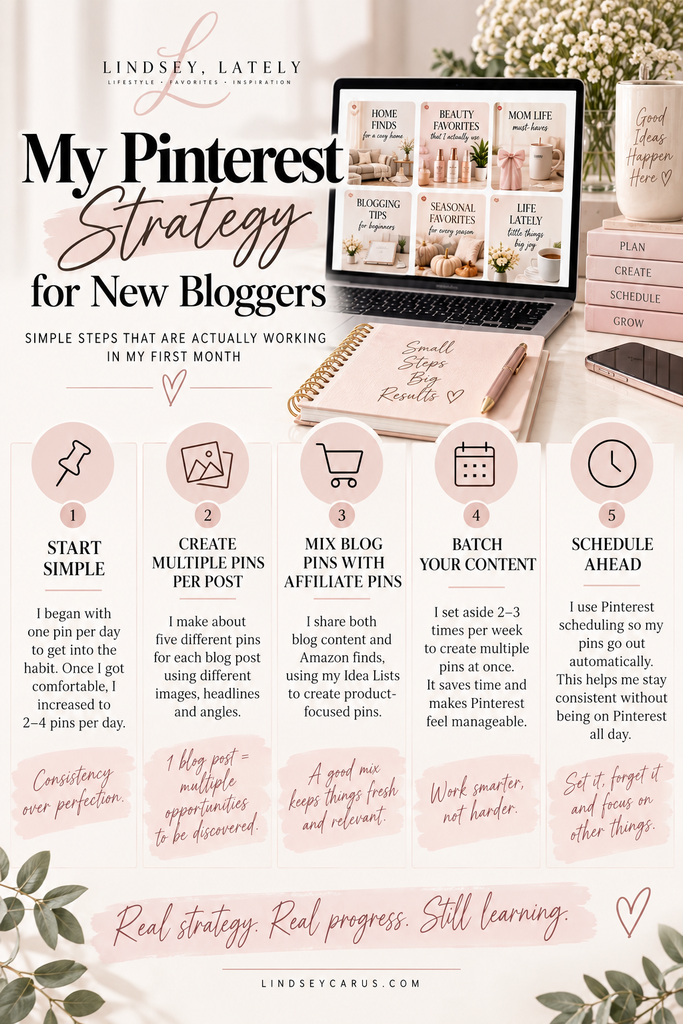
1. I Started With One Pin Per Day
When I first started consistently using Pinterest, my goal was simple:
Post at least one pin every day.
I didn’t want to overwhelm myself by immediately trying to create a huge amount of content.
I was already building my website, writing blog posts, creating social media content, filming Amazon review videos and doing everything else that comes with trying to build an online business.
Adding Pinterest to that list felt like…a lot. 😂
One pin a day felt manageable.
More importantly, it helped me get into the habit of creating Pinterest content consistently.
Once I became more comfortable with the process, I gradually increased how much I was posting.
Now I’m typically posting around 2–4 pins per day.
And strangely enough, creating more pins actually feels less overwhelming now than creating one did when I started.
The difference is the system I’ve built around it.
2. I Create About Five Pins for Every Blog Post
One of the biggest things I’ve learned is that publishing a blog post doesn’t mean I have to create one Pinterest pin for it.
Right now, I typically create around five different pins for each blog article.
They all lead back to the same blog post, but I can change things like the headline, graphic, image or angle.
For example, one blog post could potentially give me pins focused on:
The main article topic → a specific problem the article solves → a list or number → a curiosity-driven headline → a specific tip from the article
That means I’m getting much more Pinterest content out of something I’ve already spent hours creating.
Instead of:
1 blog post = 1 pin
I’m thinking:
1 blog post = multiple opportunities to be discovered.
And as someone trying to manage several different content platforms, I LOVE being able to repurpose the work I’ve already done.
3. I Mix Blog Pins With Amazon Affiliate Pins
Not everything I post to Pinterest leads back to my blog.
I also create Amazon affiliate pins based around products and collections I’ve already curated.
One of the easiest ways I’ve found to do this is through my Amazon storefront Idea Lists.
I’ve already spent time grouping products into categories and themes, so those lists give me a starting point when I’m creating Pinterest content.
Instead of sitting down and thinking:
Okay…what am I supposed to make a pin about today?
I can look through the product collections I’ve already created and turn them into Pinterest-friendly ideas.
For example, I can create pins around seasonal products, home finds, beauty favorites, mom-life products, gift ideas or other curated themes.
Then I sprinkle those pins throughout my scheduled blog content.
For me, that creates a nice mix between content designed to send people to my website and affiliate-focused content built around products I’m already sharing.
Affiliate note: Some of my Pinterest content contains affiliate links. When I use affiliate links, I disclose that relationship and follow the applicable platform and affiliate-program requirements.
4. I Batch My Pinterest Content Instead of Making Pins Every Day
THIS has probably made the biggest difference in whether Pinterest feels manageable.
When I first thought about posting multiple pins every single day, my immediate reaction was:
How am I supposed to add THIS to everything else I’m already doing?! 😂
The answer was surprisingly simple.
I stopped trying to do Pinterest every day.
Instead, I set aside time about 2–3 times per week to work specifically on Pinterest.
During those blocks of time, I’ll create multiple pins at once, write the titles and descriptions and get everything scheduled.
Once they’re done?
I can move on.
That leaves my other workdays available for things like writing blog posts, planning social media content, filming Amazon onsite review videos and everything else I need to get done.
At first, creating enough content to post several pins per day felt overwhelming.
Once I developed a rhythm, though, it started going SO much faster.
5. Pinterest Scheduling Has Been a Lifesaver
If there’s one feature that has made my current strategy possible, it’s scheduling.
Seriously.
LIFE. SAVER. 😂
Rather than remembering several times throughout the day that I need to stop what I’m doing and post something to Pinterest, I can create my pins in batches and schedule them ahead of time.
So while Pinterest may be publishing 2–4 pins for me on a particular day, that doesn’t necessarily mean I sat down and worked on Pinterest that day.
I may have scheduled those pins days earlier.
This is a huge reason I’ve been able to become more consistent without feeling like I’ve added another social platform that needs my attention 24/7.
My Pinterest Results After My First Month of Consistently Pinning
This is the part I really wanted to document.
Not because these are massive Pinterest numbers.
They’re not.
But because this is what the beginning actually looks like for me.
During the 30-day period from August 23 through September 22, 2026, my Pinterest analytics showed:
12K impressions
1K engagements
20 outbound clicks
155 saves
8.6K total audience
740 engaged audience
And my account had…
7 followers.
Yep. Seven. 😂
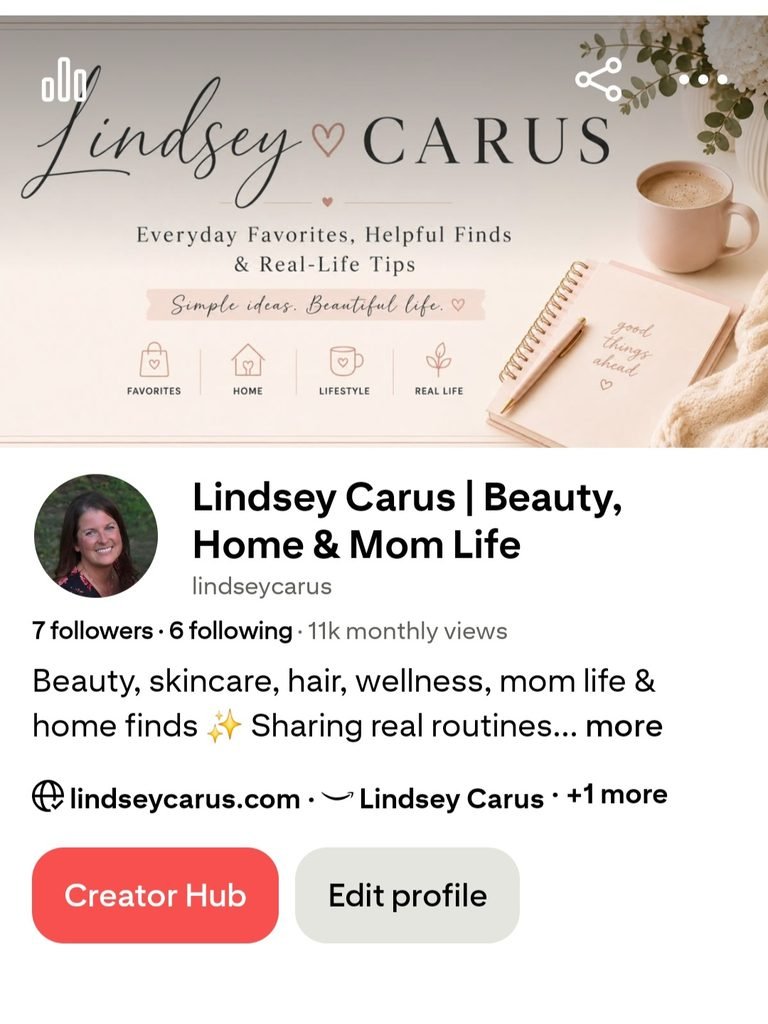
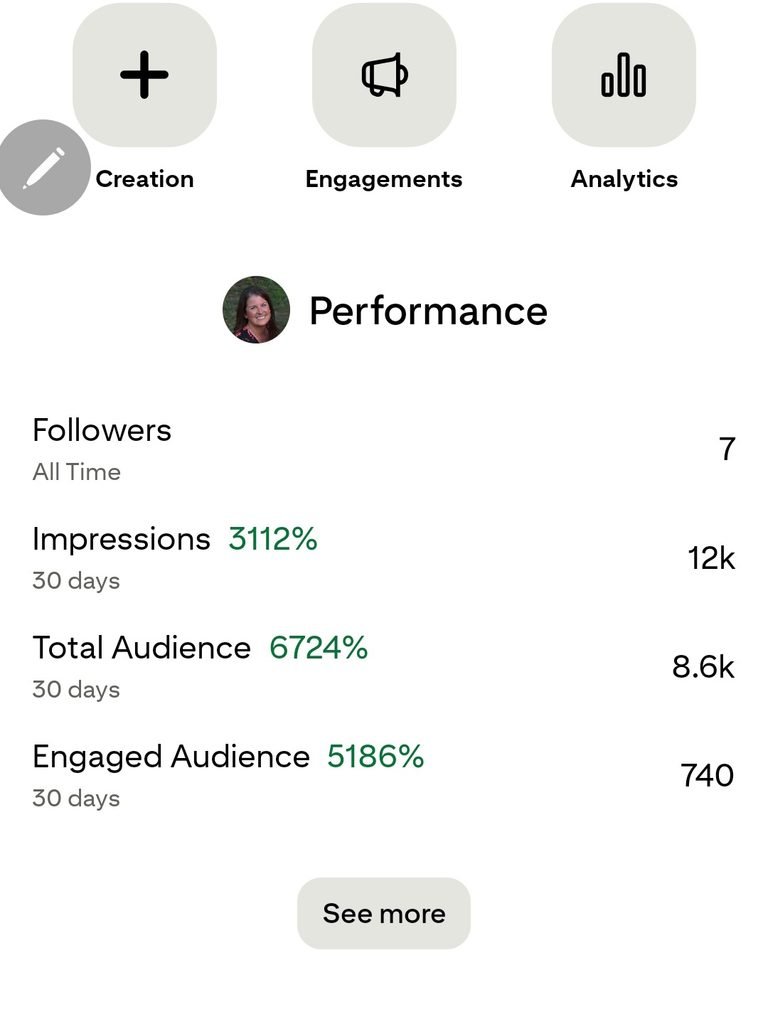
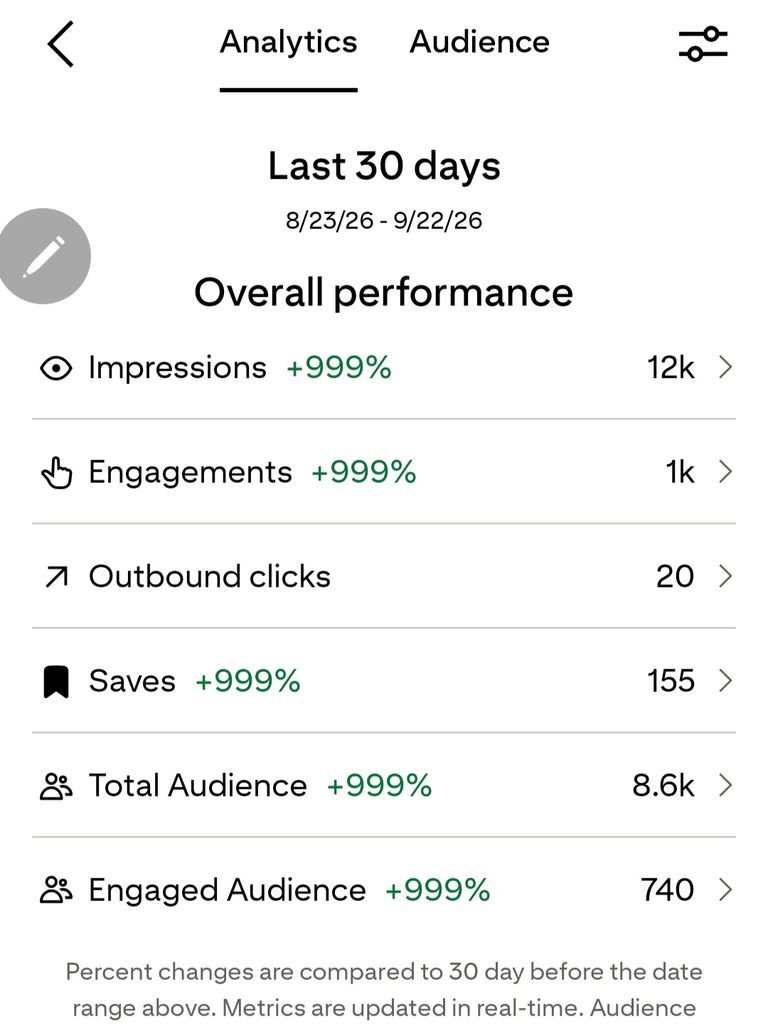
My Pinterest analytics after a little over a month of consistently creating and scheduling pins.
I think this is especially important to show when talking about Pinterest for new bloggers, because it’s easy to look at established accounts and feel like you’re already behind.
That last number has probably been one of the most interesting things for me.
If I were looking only at my follower count, I could easily assume that nothing was happening.
But my pins have been shown thousands of times while my follower count is still tiny.
One of my top pins during this period even reached around 3.4K impressions on its own.
That doesn’t mean every pin I create performs well.
They definitely don’t.
Some barely seem to move at all.
But seeing individual pins begin to get more distribution has helped me realize why I don’t want to judge Pinterest based on what happens immediately after I publish something.
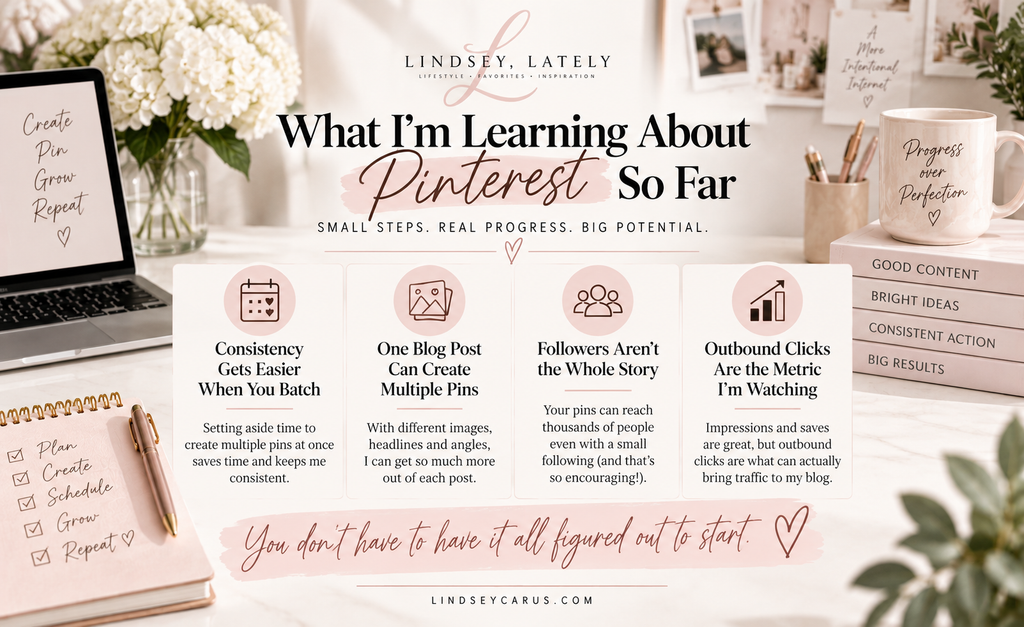
I’m only a little over a month into consistently posting, but I’ve already learned a few things that have changed the way I’m approaching it.
Consistency Feels Much Easier When I Batch Everything
If I had to design, write and publish 2–4 individual pins every single day, I don’t think I would keep up with it.
Batching completely changed that.
When I’m already in “Pinterest mode,” it’s much easier to create several graphics in a row than it is to constantly switch between Pinterest, blogging, Instagram, Amazon and everything else.
That has probably been the biggest productivity lesson I’ve learned so far.
One Blog Post Can Give Me A LOT of Content
This has changed the way I think about blogging in general.
I’m not just writing an article and promoting it once.
Every article becomes a little content library.
I can create multiple Pinterest pins from it, pull pieces of it for social media, turn sections into short-form content and potentially revisit it months later with another angle.
That makes the amount of time I spend writing a blog post feel much more worthwhile.
I’m Paying Attention to More Than Followers
Coming from traditional social media, it’s really easy to look at your follower count first.
And if I did that right now?
Seven followers wouldn’t exactly look impressive. 😂
But when I look at the rest of my analytics, I get a completely different picture.
My content reached a total audience of 8.6K during this 30-day period.
That doesn’t mean 8,600 people visited my blog—the analytics separately show 20 outbound clicks—but it does tell me that my content is being discovered beyond the handful of people following my account.
That’s why I’m currently paying attention to several metrics instead of obsessing over follower growth alone.
I’m Starting to Care More About Outbound Clicks
Impressions are exciting.
I’m not going to pretend I don’t like seeing that number go up. 😂
But one of my biggest goals for Pinterest is ultimately to get people to take the next step—especially when I’m using Pinterest to promote my blog.
That’s why I’m increasingly interested in outbound clicks.
Right now, my analytics show 20 during this 30-day period.
That isn’t huge traffic yet, but it’s something I can track as I continue experimenting with different designs, titles and topics.
And because some of my pins are blog pins while others are affiliate-focused, I also have to remember that the overall outbound-click number isn’t automatically the same thing as “20 blog visits.”
As my account grows, this is one of the metrics I’m especially interested in watching.
What I Would Tell Another New Blogger Starting Pinterest
If you’re researching Pinterest for new bloggers because you’re trying to figure out whether it’s worth adding to your blogging strategy, my biggest takeaway so far is to start simple and give yourself time to learn.
If you’re staring at a blank Pinterest account right now thinking you need to understand everything before you begin…
You don’t.
I know because that’s exactly what I did for more than six months. 😂
I kept thinking I needed to figure out what my Pinterest should look like, what I should post and what my entire strategy was going to be before I could start.
And you know what finally helped?
Actually starting.
My first strategy wasn’t complicated.
I posted one pin a day.
Then I learned.
I experimented.
I started creating more graphics for each blog post.
I incorporated my Amazon content.
I figured out batching.
I started scheduling.
And gradually, something that originally felt completely overwhelming became another part of my normal content workflow.
You don’t have to start with 2–4 pins a day because that’s what I’m currently doing.
You don’t have to make exactly five graphics for every article.
And you definitely don’t need your Pinterest page to be perfect before you publish your first pin.
Start with something you can realistically maintain.
Then pay attention to what happens.
What’s Next for My Pinterest Strategy?
For now, I’m going to keep doing what I’m doing while paying attention to the data.
I want to continue creating multiple pins for my blog posts, testing different headlines and designs, mixing in my curated Amazon content and watching which topics seem to connect with people.
I’m especially interested in seeing whether my outbound clicks grow as my library of pins gets larger.
And I’m giving Pinterest time.
I’ve only been consistently posting for a little over a month. That’s nowhere near enough time for me to declare that I’ve figured out Pinterest—or that one specific strategy is responsible for everything I’m seeing.
But that’s also why I wanted to write this post now.
I don’t want to only show the polished version later.
I want to document what building this actually looks like from the beginning.
So I’ll come back and update this article as my account grows, my strategy changes and I learn what works—and what absolutely does not. 😂
For now?
I’m going to keep pinning.
And considering this account sat completely empty for more than six months because I had no clue where to start…
I’d say that’s progress. 💗
Want to See What I’m Pinning?
If you want to see this strategy in action, follow me on Pinterest. I’m sharing my newest blog posts, Amazon finds, seasonal favorites and everything else I’m experimenting with as I grow my account.
Want to Follow Along?
I’m building Lindsey, Lately in real time and sharing what I’m learning along the way—from blogging and digital marketing to Pinterest, affiliate marketing and content creation.
If you’re building something of your own too, join my email list and I’ll send my newest blog posts, tips, favorites and updates straight to your inbox.
No spam. Just the good stuff.